
图标文件放置位置错误,导致图标不显示。 我自己的解决方法是更改desktop文件,使用绝对路径指向图标文件
建议更改图标文件路径,如果ico文件放置在/usr/share/icons/hicolor/<pixel>x<pixel>/apps内还是无效的话建议从ico文件中提取png文件并单独提供在source里
| Git Clone URL: | https://aur.archlinux.org/dingtalk-bin.git (read-only, click to copy) |
|---|---|
| Package Base: | dingtalk-bin |
| Description: | 钉钉 |
| Upstream URL: | https://www.dingtalk.com/ |
| Keywords: | alibaba dingtalk 钉钉 |
| Licenses: | custom |
| Conflicts: | com.alibabainc.dingtalk |
| Provides: | com.alibabainc.dingtalk, dingtalk |
| Replaces: | com.alibabainc.dingtalk |
| Submitter: | zhullyb |
| Maintainer: | zhullyb (sukanka, yjun, witt.9099, Integral) |
| Last Packager: | zhullyb |
| Votes: | 48 |
| Popularity: | 0.174927 |
| First Submitted: | 2021-08-12 11:57 (UTC) |
| Last Updated: | 2026-02-26 09:45 (UTC) |
图标文件放置位置错误,导致图标不显示。 我自己的解决方法是更改desktop文件,使用绝对路径指向图标文件
建议更改图标文件路径,如果ico文件放置在/usr/share/icons/hicolor/<pixel>x<pixel>/apps内还是无效的话建议从ico文件中提取png文件并单独提供在source里
read cache UMID seccessful Application::InitAppPaths() module path: /opt/dingtalk/release **** GetXDGDirectory [50367:50367:2021/12/01 16:04:03:INFO:application.cc(282)] InitGlobalDB() /home/lm/.config/DingTalk/userdata Application::InitServerInformation() Application::InitIMSDK() Application::InitHttpManager() begin Application::InitHttpManager() end Application::InitInstance() success [50367:50367:2021/12/01 16:04:03:INFO:sync_unit_helper.cpp(493)] [SYNC_UNIT] AddSyncDataHandler, topic=sync [50367:50367:2021/12/01 16:04:03:INFO:sync_manager.cpp(567)] [SYNC] addSyncDataHandler, topic=sync qt.qpa.plugin: Could not find the Qt platform plugin "xcb " in "" This application failed to start because no Qt platform plugin could be initialized. Reinstalling the application may fix this problem.
Available platform plugins are: xcb.
/usr/bin/dingtalk: line 3: 50367 Aborted (core dumped) LD_PRELOAD="/usr/lib/libnss3.so" ./com.alibabainc.dingtalk
1.2.0.120包构建失败,提示如下
install: cannot stat 'opt/apps/com.alibabainc.dingtalk/files/logo.svg': No such file or directory
update:
文件名好像变成了./opt/apps/com.alibabainc.dingtalk/files/logo.ico
请问现在还不支持投屏吗
工作台内的应用,不能输入中文,是否有解决方案
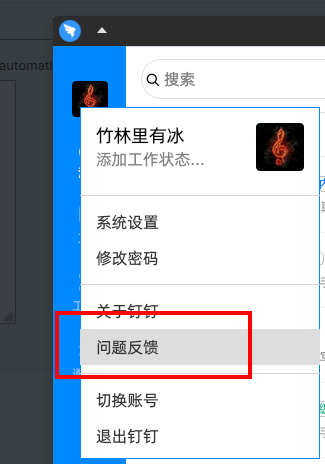
@interskh 应用内部有反馈渠道 https://z3.ax1x.com/2021/10/14/5lxPGd.png
@interskh 官方的反馈渠道在内测用户的钉钉群,你到钉钉官网看看应该有个内测二维码
有linux正式版很好,但是小问题有点多。官方反馈渠道在哪里啊?
日历和工作台中的应用都无法输入中文,有办法解决吗?
@everyx 建议自行在 ~/.local/share/applications 自定义添加,这个环境变量设置对于 xorg 用户是冗余的
Pinned Comments
witt.9099 commented on 2024-12-12 10:26 (UTC) (edited on 2024-12-12 10:28 (UTC) by witt.9099)
大家向钉钉官方反馈,我反馈很多次了,他们并不打算解决!
新版占用高,卡顿的问题,可通过 头像==>设置与隐私==>⭐高级==>极速聊天模式缓解