1
2
3
4
5
6
7
8
9
10
11
12
13
14
15
16
17
18
19
20
21
22
23
24
25
26
27
28
29
30
31
32
33
34
35
36
37
38
39
40
41
42
43
44
45
46
47
48
49
50
51
52
53
54
55
56
57
58
59
60
61
62
63
64
65
66
67
68
69
70
71
72
73
74
75
76
77
78
79
80
81
82
83
84
85
86
87
88
89
90
91
92
93
94
95
96
97
98
99
100
101
102
103
104
105
106
107
108
109
110
111
112
113
114
115
116
117
118
119
120
121
122
123
124
125
126
127
128
129
130
131
132
133
134
135
136
137
138
139
140
141
142
143
144
145
146
147
148
149
150
151
152
153
154
155
156
157
158
159
160
161
162
163
164
165
166
167
168
169
170
171
172
173
174
175
176
177
178
179
180
181
182
183
184
185
186
187
188
189
190
191
192
193
194
195
196
197
198
199
200
201
202
203
204
205
206
207
208
209
210
211
212
213
214
215
216
217
218
219
220
221
222
223
224
225
226
227
228
229
230
231
232
233
234
235
236
237
238
239
240
241
242
243
244
245
246
247
248
249
250
251
252
253
254
255
256
257
258
259
260
261
262
263
264
265
266
267
268
269
270
271
272
273
274
275
276
277
278
279
280
281
282
283
284
285
286
287
288
289
290
291
292
293
294
295
296
297
298
299
300
301
302
303
304
305
306
307
308
309
310
311
312
313
314
315
316
317
318
319
320
321
322
323
324
325
326
327
328
329
330
331
332
333
334
335
336
337
338
339
340
341
342
343
344
345
346
347
348
349
350
351
352
353
354
355
356
357
358
359
360
361
362
363
364
365
366
367
368
369
370
371
372
373
374
375
376
377
378
379
380
381
382
383
384
385
386
387
388
389
390
391
392
393
394
395
396
397
398
399
400
401
402
403
404
405
406
407
408
409
410
411
412
413
414
415
416
417
418
419
420
421
422
423
424
425
426
427
428
429
430
431
432
433
434
435
436
437
438
439
440
441
442
443
444
445
446
447
448
449
450
451
452
453
454
455
456
457
458
459
460
461
462
463
464
465
466
467
468
469
470
471
472
473
474
475
476
477
478
479
480
481
482
483
484
485
486
487
488
489
490
491
492
493
494
495
496
497
498
499
500
501
502
503
504
505
506
507
508
509
510
511
512
513
514
515
516
517
518
519
520
521
522
523
524
525
526
527
528
529
530
531
532
533
534
535
536
537
538
539
540
541
542
543
544
545
546
547
548
549
550
551
552
553
554
555
556
557
558
559
560
561
562
563
564
565
566
567
568
569
570
571
572
573
574
575
576
577
578
579
580
581
582
583
584
585
586
587
588
589
590
591
592
593
594
595
596
597
598
599
600
601
602
603
604
605
606
607
608
609
610
611
612
613
614
615
616
617
618
619
620
621
622
623
624
625
626
627
628
629
630
631
632
633
634
635
636
637
638
639
640
641
642
643
644
645
646
647
648
649
650
651
652
653
654
655
656
657
658
659
660
661
662
663
664
665
666
667
668
669
670
671
672
673
674
675
676
677
678
679
680
681
682
683
684
685
686
687
688
689
690
691
692
693
694
695
696
697
698
699
700
701
702
703
704
705
706
707
708
709
710
711
712
713
714
715
716
717
718
719
720
721
722
723
724
725
726
727
728
729
730
731
732
733
734
735
736
737
738
739
740
741
742
743
744
745
746
747
748
749
750
751
752
753
754
755
756
757
758
759
|
# nGPT
<p align="center">
<img src="https://raw.githubusercontent.com/nazdridoy/ngpt/main/.github/banner.svg" alt="nGPT Banner">
</p>
<p align="center">
<a href="https://pypi.org/project/ngpt/"><img src="https://img.shields.io/pypi/v/ngpt.svg" alt="PyPI version"></a>
<a href="https://aur.archlinux.org/packages/ngpt"><img alt="AUR Version" src="https://img.shields.io/aur/version/ngpt"></a>
<a href="https://opensource.org/licenses/MIT"><img src="https://img.shields.io/badge/License-MIT-yellow.svg" alt="License: MIT"></a>
<a href="https://nazdridoy.github.io/ngpt/"><img src="https://img.shields.io/badge/docs-available-brightgreen.svg" alt="Documentation"></a>
<a href="https://deepwiki.com/nazdridoy/ngpt"><img src="https://deepwiki.com/badge.svg" alt="Ask DeepWiki [DOCS]"></a>
</p>
<p align="center">
<a href="https://nazdridoy.github.io/ngpt/installation/#linuxmacos"><img src="https://img.shields.io/badge/Linux-support-blue?logo=linux" alt="Linux"></a>
<a href="https://nazdridoy.github.io/ngpt/installation/#windows"><img src="https://img.shields.io/badge/Windows-support-blue?logo=windows" alt="Windows"></a>
<a href="https://nazdridoy.github.io/ngpt/installation/#linuxmacos"><img src="https://img.shields.io/badge/macOS-support-blue?logo=apple" alt="macOS"></a>
<a href="https://nazdridoy.github.io/ngpt/installation/#android-termux"><img src="https://img.shields.io/badge/Android-Termux-blue?logo=android" alt="Android"></a>
</p>
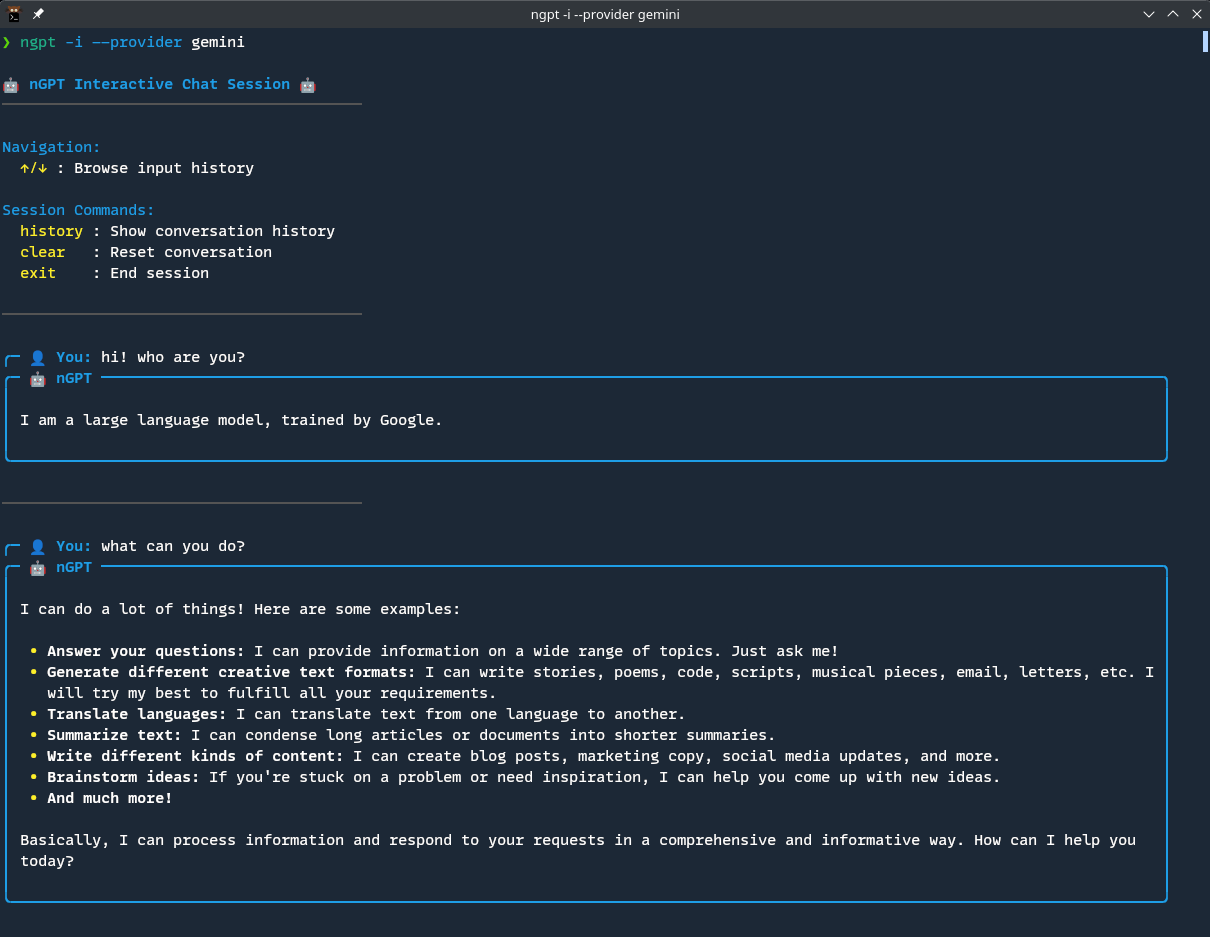
🤖 **nGPT** - A lightning-fast CLI tool that brings any OpenAI-compatible LLM (OpenAI, Ollama, Groq, Claude, Gemini) directly to your terminal. Generate code, craft git commits, execute shell commands, rewrite text, and chat interactively, all with seamless provider switching and real-time streaming.
## Features
- ✅ **Versatile**: Powerful and easy-to-use CLI tool for various AI tasks
- 🪶 **Lightweight**: Minimal dependencies with everything you need included
- 🔄 **API Flexibility**: Works with OpenAI, Ollama, Groq, Claude, Gemini, and any OpenAI-compatible endpoint
- 💬 **Interactive Chat**: Continuous conversation with memory in modern UI
- 📊 **Streaming Responses**: Real-time output for better user experience
- 🔍 **Web Search**: Enhance any model with contextual information from the web, using advanced content extraction to identify the most relevant information from web pages
- 📥 **Stdin Processing**: Process piped content by using `{}` placeholder in prompts
- 🎨 **Markdown Rendering**: Beautiful formatting of markdown and code with syntax highlighting
- ⚡ **Real-time Markdown**: Stream responses with live updating syntax highlighting and formatting
- ⚙️ **Multiple Configurations**: Cross-platform config system supporting different profiles
- 💻 **Shell Command Generation**: OS-aware command execution
- 🧠 **Text Rewriting**: Improve text quality while maintaining original tone and meaning
- 🧩 **Clean Code Generation**: Output code without markdown or explanations
- 📝 **Rich Multiline Editor**: Interactive multiline text input with syntax highlighting and intuitive controls
- 📑 **Git Commit Messages**: AI-powered generation of conventional, detailed commit messages from git diffs
- 🎭 **System Prompts**: Customize model behavior with custom system prompts
- 🤖 **Custom Roles**: Create and use reusable AI roles for specialized tasks
- 📃 **Conversation Logging**: Save your conversations to text files for later reference
- 💾 **Session Management**: Save, load, and list interactive chat sessions with advanced session manager
- 🔌 **Modular Architecture**: Well-structured codebase with clean separation of concerns
- 🔄 **Provider Switching**: Easily switch between different LLM providers with a single parameter
- 🚀 **Performance Optimized**: Fast response times and minimal resource usage
See the [Feature Overview](https://nazdridoy.github.io/ngpt/overview/) for more details.
## Table of Contents
- [Features](#features)
- [Installation](#installation)
- [Quick Start](#quick-start)
- [Usage](#usage)
- [Command Line Options](#command-line-options)
- [Documentation](https://nazdridoy.github.io/ngpt/)
- [Documentation](#documentation)
- [Configuration](#configuration)
- [API Key Setup](#api-key-setup)
- [OpenAI API Key](#openai-api-key)
- [Google Gemini API Key](#google-gemini-api-key)
- [CLI Configuration](#cli-configuration)
- [Interactive Configuration](#interactive-configuration)
- [Configuration File](#configuration-file)
- [Configuration Priority](#configuration-priority)
- [Contributing](#contributing)
- [License](#license)
## Installation
```bash
# Installation with pip
pip install ngpt
# Or install with uv (faster installation)
uv pip install ngpt
# Or install globally as a CLI tool (recommended for command-line usage)
uv tool install ngpt
# Arch Linux: install from AUR
paru -S ngpt
```
Requires Python 3.8 or newer.
For detailed installation instructions, see the [Installation Guide](https://nazdridoy.github.io/ngpt/installation/).
## Quick Start
```bash
# Chat with default settings
ngpt "Tell me about quantum computing"
# Alternatively, run as a Python module
python -m ngpt "Tell me about quantum computing"
# Start an interactive chat session with conversation memory
ngpt -i
# Inside interactive mode, you can use commands like:
# /editor - Open multiline editor for complex inputs
# /exit - Exit the session (also 'exit', 'quit', 'bye' without '/')
# /help - Show help menu
# /reset - Reset the conversation
# /sessions - Manage saved sessions
# /transcript - Show recent conversation exchanges
# Keyboard shortcuts:
# Ctrl+E - Open multiline editor for complex inputs
# Ctrl+C - Exit the session
# ↑/↓ - Navigate command history
# Session management improvements:
# - Commands like preview, load, rename, delete now default to the latest session
# - Example: 'load' (loads the latest session) vs 'load 2' (loads session at index 2)
# Return response without streaming
ngpt --plaintext "Tell me about quantum computing"
# Generate code
ngpt --code "function to calculate the Fibonacci sequence"
# Generate code with real-time syntax highlighting (default)
ngpt --code "function to calculate the Fibonacci sequence"
# Generate code without streaming or markdown rendering
ngpt --code --plaintext "function to calculate the Fibonacci sequence"
# Generate and execute shell commands
ngpt --shell "list all files in the current directory"
# Read from stdin and use the content in your prompt
echo "What is this text about?" | ngpt --pipe "Analyze the following text: {}"
# Use interactive multiline editor to enter a command description (when no argument is provided)
ngpt -s
# Use interactive multiline editor to enter code description (when no argument is provided)
ngpt -c
# Pipe a command description to shell mode
echo "list all files" | ngpt -s
# Pipe a code description to code mode
echo "create a python request" | ngpt -c --language python
# Using here-string (<<<) for quick single-line input
ngpt --pipe {} <<< "What is the best way to learn shell redirects?"
# Using standard input redirection to process file contents
ngpt --pipe "summarise {}" < README.md
# Using here-document (<<EOF) for multiline input
ngpt --pipe {} << EOF
What is the best way to learn Golang?
Provide simple hello world example.
EOF
# Create a custom role for specialized tasks
ngpt --role-config create json_generator
# Use a custom role for specific tasks
ngpt --role json_generator "Generate user data with name, email, and address"
# Use a role from the Role Gallery (first create it, then use it)
ngpt --role-config create sql_expert
# Paste the SQL Expert role from https://nazdridoy.github.io/ngpt/examples/role-gallery/
ngpt --role sql_expert "Write a query to find all users who made a purchase in the last 30 days"
# Rewrite text to improve quality while preserving tone and meaning
echo "your text" | ngpt -r
# Rewrite text from a command-line argument
ngpt -r "your text to rewrite"
# Use interactive multiline editor if no argument is provided
ngpt -r
# Rewrite text from a file
cat file.txt | ngpt -r
# Generate AI-powered git commit messages for staged changes
ngpt -g
# Generate commit message from staged changes with a context directive
ngpt -g --preprompt "type:feat"
# Process large diffs in chunks with recursive analysis
ngpt -g --rec-chunk
# Process a diff file instead of staged changes
ngpt -g --diff /path/to/changes.diff
# Use piped diff content for commit message generation
git diff HEAD~1 | ngpt -g --pipe
# Generate a commit message with logging for debugging
ngpt -g --log commit_log.txt
# Use interactive multiline editor to enter text to rewrite
ngpt -r
# Display markdown responses with real-time formatting (default)
ngpt "Explain markdown syntax with examples"
# Display responses without markdown rendering
ngpt --plaintext "Explain markdown syntax with examples"
# Use multiline editor for complex prompts
ngpt --text
# Use custom system prompt
ngpt --preprompt "You are a Linux expert" "How do I find large files?"
# Log your conversation to a file
ngpt --interactive --log conversation.log
# Create a temporary log file automatically
ngpt --log "Tell me about quantum computing"
# Process text from stdin using the {} placeholder
cat README.md | ngpt --pipe "Summarize this document: {}"
# Use different model providers by specifying the provider name
ngpt --provider Groq "Explain quantum computing"
# Compare outputs from different providers
ngpt --provider OpenAI --plaintext "Explain quantum physics" > openai_response.txt
ngpt --provider Ollama --plaintext "Explain quantum physics" > ollama_response.txt
# Show all API configurations
ngpt --show-config --all
# List available models for the active configuration
ngpt --list-models
# List models for a specific configuration (index)
ngpt --list-models --config-index 1
# List models for a specific configuration (provider)
ngpt --list-models --provider Gemini
# With custom options
ngpt --api-key your-key --base-url http://your-endpoint --model your-model "Hello"
# Enable web search capability to enhance prompts with web information
ngpt --web-search "What's the latest news about AI?"
# Generate and execute shell commands (using -s or --shell flag)
# OS-aware: generates appropriate commands for Windows, macOS, or Linux
ngpt -s "list all files in current directory"
# On Windows generates: dir
# On Linux/macOS generates: ls -la
# Generate code (using -c or --code flag)
ngpt -c "create a python function that calculates fibonacci numbers"
# Use multiline text editor for complex prompts (using -t or --text flag)
ngpt -t
```
For more examples and detailed usage, visit the [CLI Usage Guide](https://nazdridoy.github.io/ngpt/usage/cli_usage/).
## Usage
### Command Line Options
```console
❯ ngpt -h
usage: ngpt [-h] [-v] [--api-key API_KEY] [--base-url BASE_URL] [--model MODEL] [--web-search] [--pipe]
[--temperature TEMPERATURE] [--top_p TOP_P] [--max_tokens MAX_TOKENS] [--log [FILE]]
[--preprompt PREPROMPT | --role ROLE] [--config [CONFIG]] [--config-index CONFIG_INDEX]
[--provider PROVIDER] [--remove] [--show-config] [--list-models] [--cli-config [COMMAND ...]]
[--role-config [ACTION ...]] [--plaintext] [--language LANGUAGE] [--rec-chunk] [--diff [FILE]]
[--chunk-size CHUNK_SIZE] [--analyses-chunk-size ANALYSES_CHUNK_SIZE] [--max-msg-lines MAX_MSG_LINES]
[--max-recursion-depth MAX_RECURSION_DEPTH] [--humanize] [-i | -s | -c | -t | -r | -g]
[prompt]
nGPT - AI-powered terminal toolkit for code, commits, commands & chat
positional arguments::
[PROMPT] The prompt to send to the language model
Global Options::
-h, --help show this help message and exit
-v, --version Show version information and exit
--api-key API_KEY API key for the service
--base-url BASE_URL Base URL for the API
--model MODEL Model to use
--web-search Enable web search capability using DuckDuckGo to enhance prompts with relevant
information
--pipe Read from stdin and use content with prompt. Use {} in prompt as placeholder
for stdin content. Can be used with any mode option except --text and
--interactive
--temperature TEMPERATURE Set temperature (controls randomness, default: 0.7)
--top_p TOP_P Set top_p (controls diversity, default: 1.0)
--max_tokens MAX_TOKENS Set max response length in tokens
--log [FILE] Set filepath to log conversation to, or create a temporary log file if no path
provided
--preprompt PREPROMPT Set custom system prompt to control AI behavior
--role ROLE Use a predefined role to set system prompt (mutually exclusive with
--preprompt)
Configuration Options::
--config [CONFIG] Path to a custom config file or, if no value provided, enter interactive
configuration mode to create a new config
--config-index CONFIG_INDEX Index of the configuration to use or edit (default: 0)
--provider PROVIDER Provider name to identify the configuration to use
--remove Remove the configuration at the specified index (requires --config and
--config-index or --provider)
--show-config Show the current configuration(s) and exit
--list-models List all available models for the current configuration and exit
--cli-config [COMMAND ...] Manage CLI configuration (set, get, unset, list, help)
--role-config [ACTION ...] Manage custom roles (help, create, show, edit, list, remove) [role_name]
Output Display Options::
--plaintext Disable streaming and markdown rendering (plain text output)
Code Mode Options::
--language LANGUAGE Programming language to generate code in (for code mode)
Git Commit Message Options::
--rec-chunk Process large diffs in chunks with recursive analysis if needed
--diff [FILE] Use diff from specified file instead of staged changes. If used without a path,
uses the path from CLI config.
--chunk-size CHUNK_SIZE Number of lines per chunk when chunking is enabled (default: 200)
--analyses-chunk-size ANALYSES_CHUNK_SIZE
Number of lines per chunk when recursively chunking analyses (default: 200)
--max-msg-lines MAX_MSG_LINES Maximum number of lines in commit message before condensing (default: 20)
--max-recursion-depth MAX_RECURSION_DEPTH
Maximum recursion depth for commit message condensing (default: 3)
Rewrite Mode Options::
--humanize Transform AI-generated text into human-like content that passes AI detection
tools
Modes (mutually exclusive)::
-i, --interactive Start an interactive chat session
-s, --shell Generate and execute shell commands
-c, --code Generate code
-t, --text Enter multi-line text input (submit with Ctrl+D)
-r, --rewrite Rewrite text from stdin to be more natural while preserving tone and meaning
-g, --gitcommsg Generate AI-powered git commit messages from staged changes or diff file
```
> **Note**: For better visualization of conventional commit messages on GitHub, you can use the [GitHub Commit Labels](https://greasyfork.org/en/scripts/526153-github-commit-labels) userscript, which adds colorful labels to your commits.
For a complete reference of all available options, detailed CLI examples and usage information, see the [CLI Usage Guide](https://nazdridoy.github.io/ngpt/usage/cli_usage/).
## Documentation
Comprehensive documentation, including usage guides and examples, is available at:
**[https://nazdridoy.github.io/ngpt/](https://nazdridoy.github.io/ngpt/)**
Key documentation sections:
- [Installation Guide](https://nazdridoy.github.io/ngpt/installation/)
- [CLI Usage Guide](https://nazdridoy.github.io/ngpt/usage/cli_usage/)
- [Configuration Guide](https://nazdridoy.github.io/ngpt/configuration/)
- [Custom Roles Guide](https://nazdridoy.github.io/ngpt/usage/roles/)
- [Role Gallery](https://nazdridoy.github.io/ngpt/examples/role-gallery/)
- [Examples & Tutorials](https://nazdridoy.github.io/ngpt/examples/basic/)
- [Git Commit Message Guide](https://nazdridoy.github.io/ngpt/usage/gitcommsg/)
## Configuration
### API Key Setup
#### OpenAI API Key
1. Create an account at [OpenAI](https://platform.openai.com/)
2. Navigate to API keys: https://platform.openai.com/api-keys
3. Click "Create new secret key" and copy your API key
4. Configure nGPT with your key:
```bash
ngpt --config
# Enter provider: OpenAI
# Enter API key: your-openai-api-key
# Enter base URL: https://api.openai.com/v1/
# Enter model: gpt-3.5-turbo (or other model)
```
#### Google Gemini API Key
1. Create or use an existing Google account
2. Go to [Google AI Studio](https://aistudio.google.com/)
3. Navigate to API keys in the left sidebar (or visit https://aistudio.google.com/app/apikey)
4. Create an API key and copy it
5. Configure nGPT with your key:
```bash
ngpt --config
# Enter provider: Gemini
# Enter API key: your-gemini-api-key
# Enter base URL: https://generativelanguage.googleapis.com/v1beta/openai
# Enter model: gemini-2.0-flash
```
For more detailed information, refer to the [API Key Setup documentation](https://nazdridoy.github.io/ngpt/configuration/#api-key-setup).
### CLI Configuration
NGPT offers a CLI configuration system that allows you to set default values for command-line options. This is especially useful when you:
- Repeatedly use the same provider or model
- Have preferred settings for specific tasks
- Want to create different workflows based on context
For example, setting your preferred language for code generation or temperature value means you won't have to specify these parameters each time:
```console
❯ uv run ngpt --cli-config help
CLI Configuration Help:
Command syntax:
ngpt --cli-config help - Show this help message
ngpt --cli-config set OPTION VALUE - Set a default value for OPTION
ngpt --cli-config get OPTION - Get the current value of OPTION
ngpt --cli-config get - Show all CLI configuration settings
ngpt --cli-config unset OPTION - Remove OPTION from configuration
ngpt --cli-config list - List all available options with types and defaults
Available options:
General options (all modes):
config-index - Type: int (default: 0)
log - Type: str (default: None)
max_tokens - Type: int (default: None)
preprompt - Type: str (default: None)
provider - Type: str (default: None)
temperature - Type: float (default: 0.7)
top_p - Type: float (default: 1.0)
web-search - Type: bool (default: False)
Code mode options (-c/--code):
language - Type: str (default: python)
Git commit message options (-g/--gitcommsg):
analyses-chunk-size - Type: int (default: 200)
chunk-size - Type: int (default: 200)
diff - Type: str (default: None)
max-msg-lines - Type: int (default: 20)
max-recursion-depth - Type: int (default: 3)
rec-chunk - Type: bool (default: False)
Example usage:
ngpt --cli-config set language java - Set default language to java for code generation
ngpt --cli-config set temperature 0.9 - Set default temperature to 0.9
ngpt --cli-config set recursive-chunk true - Enable recursive chunking for git commit messages
ngpt --cli-config set diff /path/to/file.diff - Set default diff file for git commit messages
ngpt --cli-config get temperature - Check the current temperature setting
ngpt --cli-config get - Show all current CLI settings
ngpt --cli-config unset language - Remove language setting
Notes:
- CLI configuration is stored in:
• Linux: ~/.config/ngpt/ngpt-cli.conf
• macOS: ~/Library/Application Support/ngpt/ngpt-cli.conf
• Windows: %APPDATA%\ngpt\ngpt-cli.conf
- Settings are applied based on context (e.g., language only applies to code generation mode)
- Command-line arguments always override CLI configuration
- Some options are mutually exclusive and will not be applied together
```
For more details, see the [CLI Configuration Guide](https://nazdridoy.github.io/ngpt/usage/cli_config/).
### Interactive Configuration
The `--config` option without arguments enters interactive configuration mode, allowing you to add or edit configurations:
```bash
# Add a new configuration
ngpt --config
# Edit an existing configuration at index 1
ngpt --config --config-index 1
# Edit an existing configuration by provider name
ngpt --config --provider Gemini
# Remove a configuration at index 2
ngpt --config --remove --config-index 2
# Remove a configuration by provider name
ngpt --config --remove --provider Gemini
# Use a specific configuration by provider name
ngpt --provider OpenAI "Tell me about quantum computing"
```
In interactive mode:
- When editing an existing configuration, press Enter to keep the current values
- When creating a new configuration, press Enter to use default values
- For security, your API key is not displayed when editing configurations
- When removing a configuration, you'll be asked to confirm before deletion
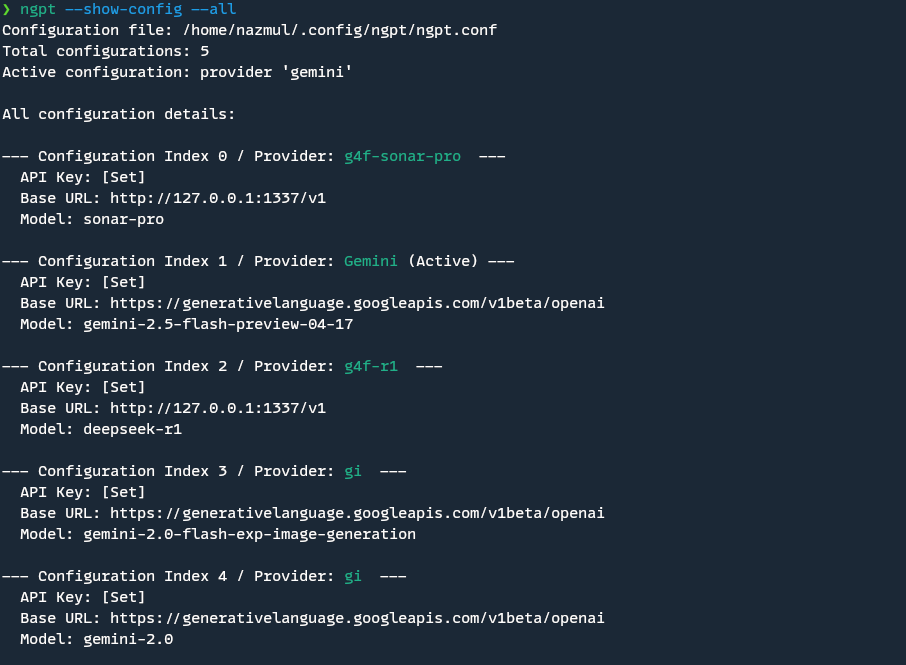
For more details on configuring nGPT, see the [Configuration Guide](https://nazdridoy.github.io/ngpt/configuration/).
### Configuration File
nGPT uses a configuration file stored in the standard user config directory for your operating system:
- **Linux**: `~/.config/ngpt/ngpt.conf` or `$XDG_CONFIG_HOME/ngpt/ngpt.conf`
- **macOS**: `~/Library/Application Support/ngpt/ngpt.conf`
- **Windows**: `%APPDATA%\ngpt\ngpt.conf`
The configuration file uses a JSON list format, allowing you to store multiple configurations. You can select which configuration to use with the `--config-index` argument (or by default, index 0 is used).
#### Multiple Configurations Example (`ngpt.conf`)
```json
[
{
"api_key": "your-openai-api-key-here",
"base_url": "https://api.openai.com/v1/",
"provider": "OpenAI",
"model": "gpt-4o"
},
{
"api_key": "your-groq-api-key-here",
"base_url": "https://api.groq.com/openai/v1/",
"provider": "Groq",
"model": "llama3-70b-8192"
},
{
"api_key": "your-ollama-key-if-needed",
"base_url": "http://localhost:11434/v1/",
"provider": "Ollama-Local",
"model": "llama3"
}
]
```
For details on the configuration file format and structure, see the [Configuration Guide](https://nazdridoy.github.io/ngpt/configuration/).
### Configuration Priority
nGPT determines configuration values in the following order (highest priority first):
1. Command line arguments (`--api-key`, `--base-url`, `--model`, etc.)
2. Environment variables (`OPENAI_API_KEY`, `OPENAI_BASE_URL`, `OPENAI_MODEL`)
3. CLI configuration file (`ngpt-cli.conf`, managed with `--cli-config`)
4. Main configuration file `ngpt.conf` or `custom-config-file`
5. Default values
**Tip:** Use `ngpt --show-config` to see which configuration values are being used and their sources (command-line arguments, environment variables, or configuration file).
### Real-World Demonstrations with nGPT
Let's see nGPT in action! Here are some practical ways you can use it every day:
#### Quick Q&A and Coding
```bash
# Get a quick explanation
ngpt "Explain the difference between threads and processes in Python"
# Generate code with real-time syntax highlighting
ngpt --code "Write a Python function to reverse a linked list"
```
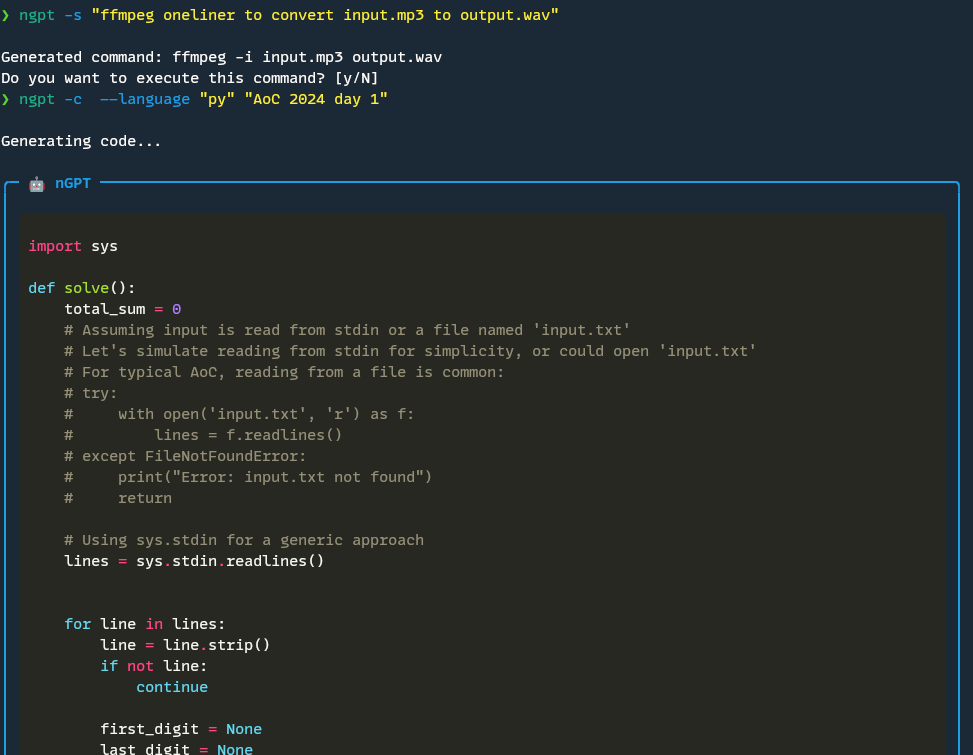
With the `--code` flag, nGPT gives you clean code without explanations or markdown, just what you need to copy and paste into your project. By default, it shows real-time syntax highlighting as the code comes in.
#### Shell Command Generation (OS-Aware)
```bash
# Let nGPT generate the correct command for your OS
ngpt --shell "list all files in the current directory including hidden ones"
# Or use the multiline editor if you have a complex request
ngpt -s
# On Linux/macOS: ls -la
# On Windows: dir /a
```
One of my favorite features! No more Googling obscure command flags, nGPT generates the right command for your operating system. It'll even execute it for you if you approve.
#### Text Rewriting and Summarization
```bash
# Pipe text to rewrite it (e.g., improve clarity)
echo "This is a rough draft of my email." | ngpt -r
# Summarize a file using the pipe placeholder
cat long-article.txt | ngpt --pipe "Summarize this document concisely: {}"
```
The text rewriting feature is perfect for quickly improving documentation, emails, or reports. And with pipe placeholders, you can feed in content from files or other commands.
#### Git Commit Message Generation
```bash
# Stage your changes
git add .
# Let nGPT generate a conventional commit message based on the diff
ngpt -g
# Generate git commit message from a diff file
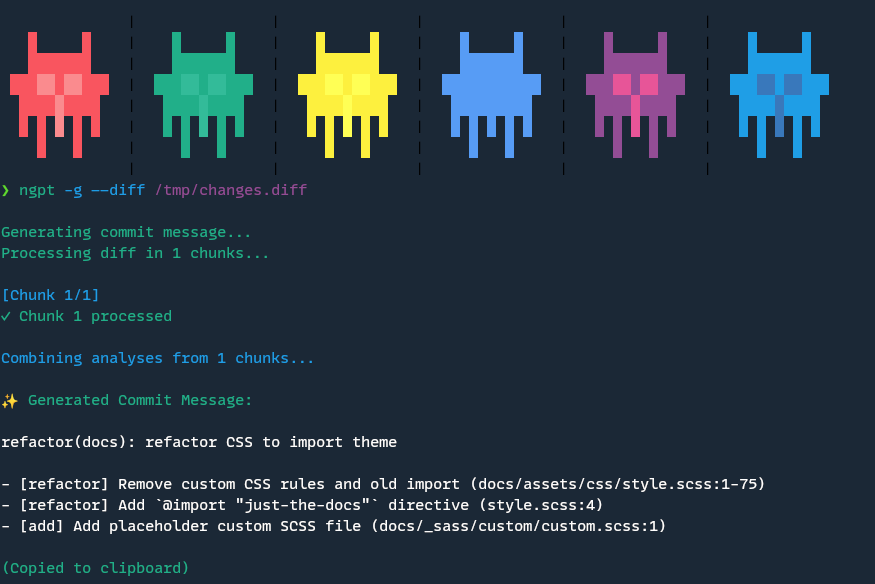
ngpt -g --diff changes.diff
```
This is a huge time-saver. nGPT analyzes your git diff and generates a properly formatted conventional commit message that actually describes what you changed. No more staring at the blank commit message prompt!
#### Custom AI Roles
```bash
# Create a specialized role for JSON generation
ngpt --role-config create json_generator
# Use the custom role to generate structured data
ngpt --role json_generator "Generate random user profile data"
```
```json
{
"id": "a1b2c3d4-e5f6-7890-1234-567890abcdef",
"firstName": "Aurora",
"lastName": "Reynolds",
"email": "aurora.reynolds@example.com",
"phone": "+1-555-0101",
"address": {
"street": "123 Main St",
"city": "Anytown",
"state": "CA",
"zipCode": "90210"
},
"birthDate": "1990-07-15",
"registrationDate": "2022-01-20",
"isActive": true,
"roles": [
"user",
"premium"
]
}
```
Custom roles allow you to create reusable AI personas for consistent responses across various prompts. For more details, see the [Custom Roles Guide](https://nazdridoy.github.io/ngpt/usage/roles/) and check out the [Role Gallery](https://nazdridoy.github.io/ngpt/examples/role-gallery/) for ready-to-use roles.
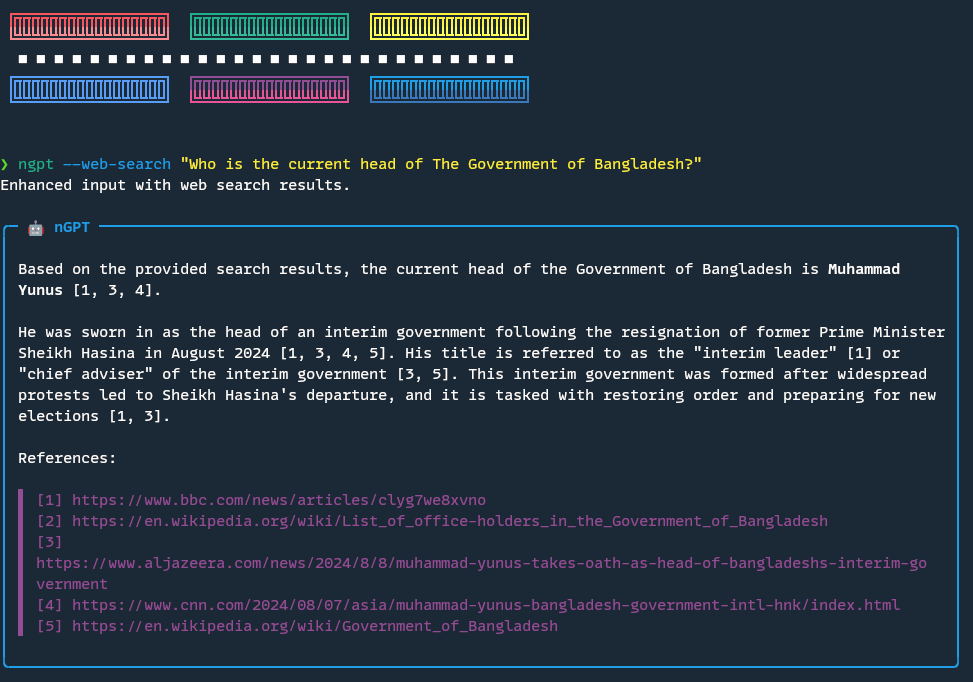
#### Web Search Integration
```bash
# Ask questions that require up-to-date information
ngpt --web-search "What's the latest news about AI regulation?"
```
The `--web-search` flag lets nGPT consult the web for recent information, making it useful for questions about current events or topics that might have changed since the AI's training data cutoff.
### Real-World Integration Examples
Let's look at how nGPT can fit into your everyday workflow with some practical examples:
#### Developer Workflow
As a developer, I use nGPT throughout my day:
**Morning code review**:
```bash
# Get explanations of complex code
git show | ngpt --pipe "Explain what this code change does and any potential issues: {}"
```
**Debugging help**:
```bash
# Help understand a cryptic error message
npm run build 2>&1 | grep Error | ngpt --pipe "What does this error mean and how can I fix it: {}"
```
**Documentation generation**:
```bash
# Generate JSDoc comments for functions
cat src/utils.js | ngpt --pipe "Write proper JSDoc comments for these functions: {}"
```
**Commit messages**:
```bash
# After finishing a feature
git add .
ngpt -g
```
#### Writer's Assistant
For content creators and writers:
**Overcoming writer's block**:
```bash
ngpt "Give me 5 different angles to approach an article about sustainable technology"
```
**Editing assistance**:
```bash
cat draft.md | ngpt -r
```
**Research summaries**:
```bash
curl -s https://example.com/research-paper.html | ngpt --pipe "Summarize the key findings from this research: {}"
```
#### System Administrator
For sysadmins and DevOps folks:
**Generating complex commands**:
```bash
ngpt -s "find all log files larger than 100MB that haven't been modified in the last 30 days"
```
*Creating configuration files**:
```bash
ngpt --code "Create a Docker Compose file for a Redis, PostgreSQL, and Node.js application"
```
**Troubleshooting systems**:
```bash
dmesg | tail -50 | ngpt --pipe "Explain what might be causing the issues based on these system logs: {}"
```
## Contributing
We welcome contributions to nGPT! Whether it's bug fixes, feature additions, or documentation improvements, your help is appreciated.
To contribute:
1. Fork the repository
2. Create a feature branch: `git checkout -b feature/your-feature-name`
3. Make your changes
4. Commit with clear messages following conventional commit guidelines
5. Push to your fork and submit a pull request
Please check the [CONTRIBUTING.md](CONTRIBUTING.md) file for detailed guidelines on code style, pull request process, and development setup.
## License
This project is licensed under the MIT License. See the [LICENSE](LICENSE) file for details.
|