Package Details: obs-studio-git 32.1.2.r109.g84b8d16-1

Git Clone URL: https://aur.archlinux.org/obs-studio-git.git (read-only, click to copy)
Package Base: obs-studio-git
Description: Free, open source software for live streaming and recording
Upstream URL: https://github.com/obsproject/obs-studio
Licenses: GPL-2.0-or-later
Conflicts: obs-studio
Provides: obs-studio
Submitter: ledti
Maintainer: benklett (xiota)
Last Packager: benklett
Votes: 112
Popularity: 0.086630
First Submitted: 2014-03-12 22:29 (UTC)
Last Updated: 2026-06-10 22:13 (UTC)

Required by (167)

Sources (4)

Pinned Comments

thotypous commented on 2021-02-05 14:12 (UTC)

If you don't want to build this package yourself, hourly builds are available at https://aur.chaotic.cx

benklett commented on 2016-02-06 23:11 (UTC) (edited on 2016-08-10 14:01 (UTC) by benklett)

This is a -git package, that means you have to update it! Please do not flag it out of date because of the version number. The version number will automatically increase to the version of the latest commit. If you want to have the stable versions, please install the package obs-studio from [community].

Latest Comments

« First ‹ Previous 1 .. 20 21 22 23 24 25 26 27 28 29 30 .. 38 Next › Last »

FickleTwit commented on 2020-06-10 19:47 (UTC) (edited on 2020-06-21 20:14 (UTC) by FickleTwit)

To get this working with Browser Source, I changed make depends "cef-minimal" to "cef-minimal-3770" - which I had already installed. Now I can drag in browser sources as intended. Using KDE-Plasma desktop environment, no issues at all.

EDIT: I see someone already said this.
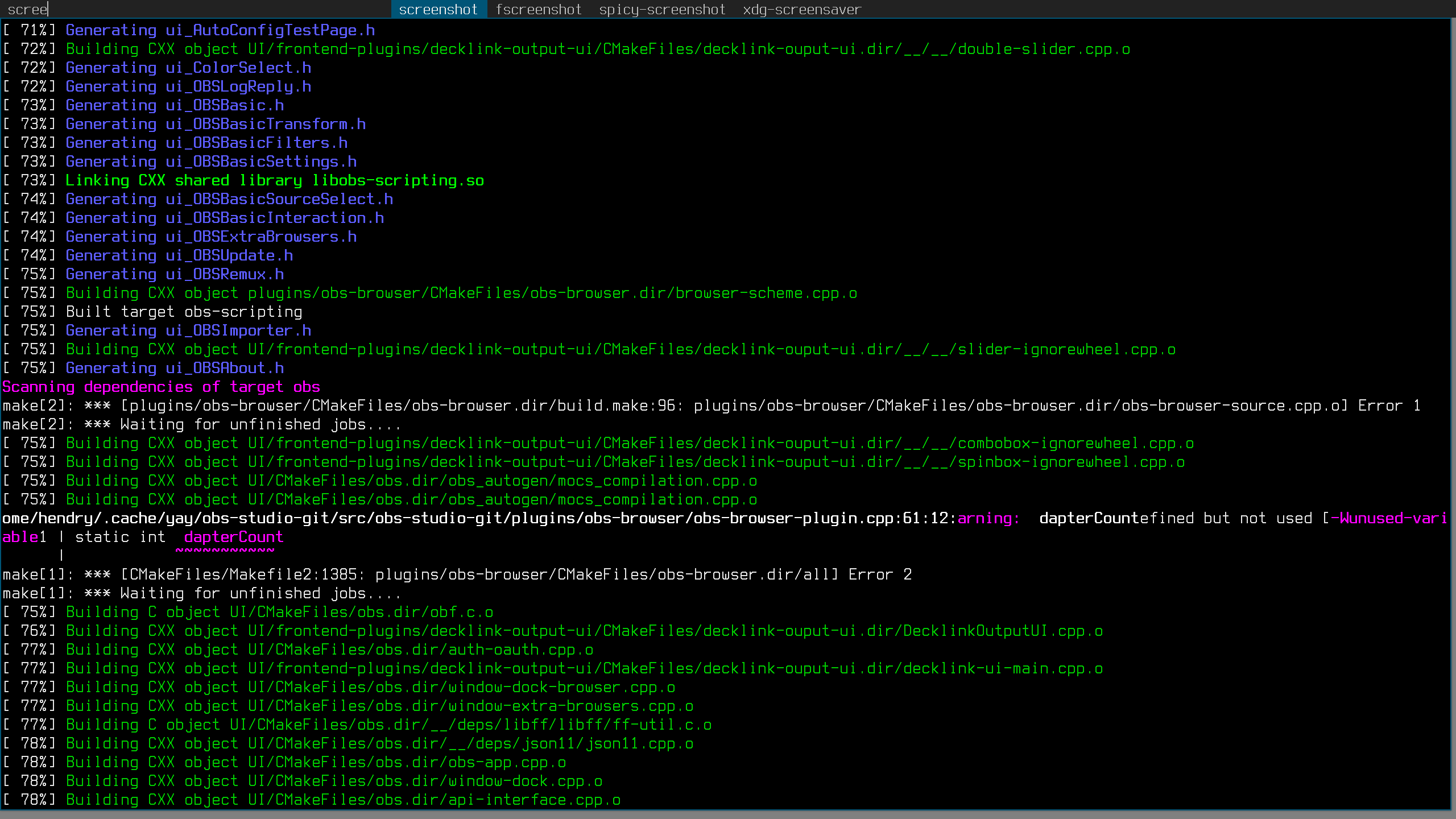
hendry commented on 2020-05-26 03:27 (UTC)

Unable to build obs-studio-git lately https://s.natalian.org/2020-05-26/1590463639_2560x1440.png

obs-ndi-git requires it

ashpie commented on 2020-05-09 04:17 (UTC)

@jprobichaud on linux, adding a browser source automatically adds an audio channel. Have you checked advanced audio properties and/or tried to unhide all audio sources? (right click in the Audio Mixer panel -> Unhide All)

jprobichaud commented on 2020-05-08 14:30 (UTC)

I'm struggling with the Browser source. It seems I can't capture the audio from the webpage, which would be quite useful when attempting to use obs.ninja (or when I test with a youtube video)!

I've tried with cef-minimal-3770 and cef-standard I don't see the "use audio" checkbox when I add a browser source (like it would on windows).

Should I also install obs-browsersource-git manually? Is it just an issue on my side?

ashpie commented on 2020-04-28 10:42 (UTC)

For anyone that had trouble installing obs with cef-minimal-3770, my bad I just noticed I forgot to add "provide cef-minimal". Now it works and you can i.e. select it in yay.

Sorry for the inconvenience.

WoofahRayet commented on 2020-04-07 22:39 (UTC)

@Arisu Your fix worked great. Thank you.

ashpie commented on 2020-04-04 00:02 (UTC)

@benklett In order to temporarily fix the package build, I created an aur package that provides fixed version cef=3770 called cef-minimal-3770 (version as recommended by obs browser devs).

If you agree with using this new package, please replace makedepends cef-minimal with cef-minimal-3770.

snaut commented on 2020-04-01 14:46 (UTC)

This does currently not build. Also why is there a package version that includes a git commit, when the source is just pulled from the master branch, but no specific commit?

friday13 commented on 2020-03-27 23:39 (UTC)

@Arisu 75.0.11 I couldn't find the package, can you give a download link, to downgrade

ashpie commented on 2020-03-25 22:15 (UTC)

@friday13 you need to downgrade your cef version (for example, downgrade cef-minimal/cef-standard to 75.0.11).

Maybe the dependency should be temporarily updated to this specific version?